Electric Standing Desk vs Desk Converter: Which Is the Better Upgrade?
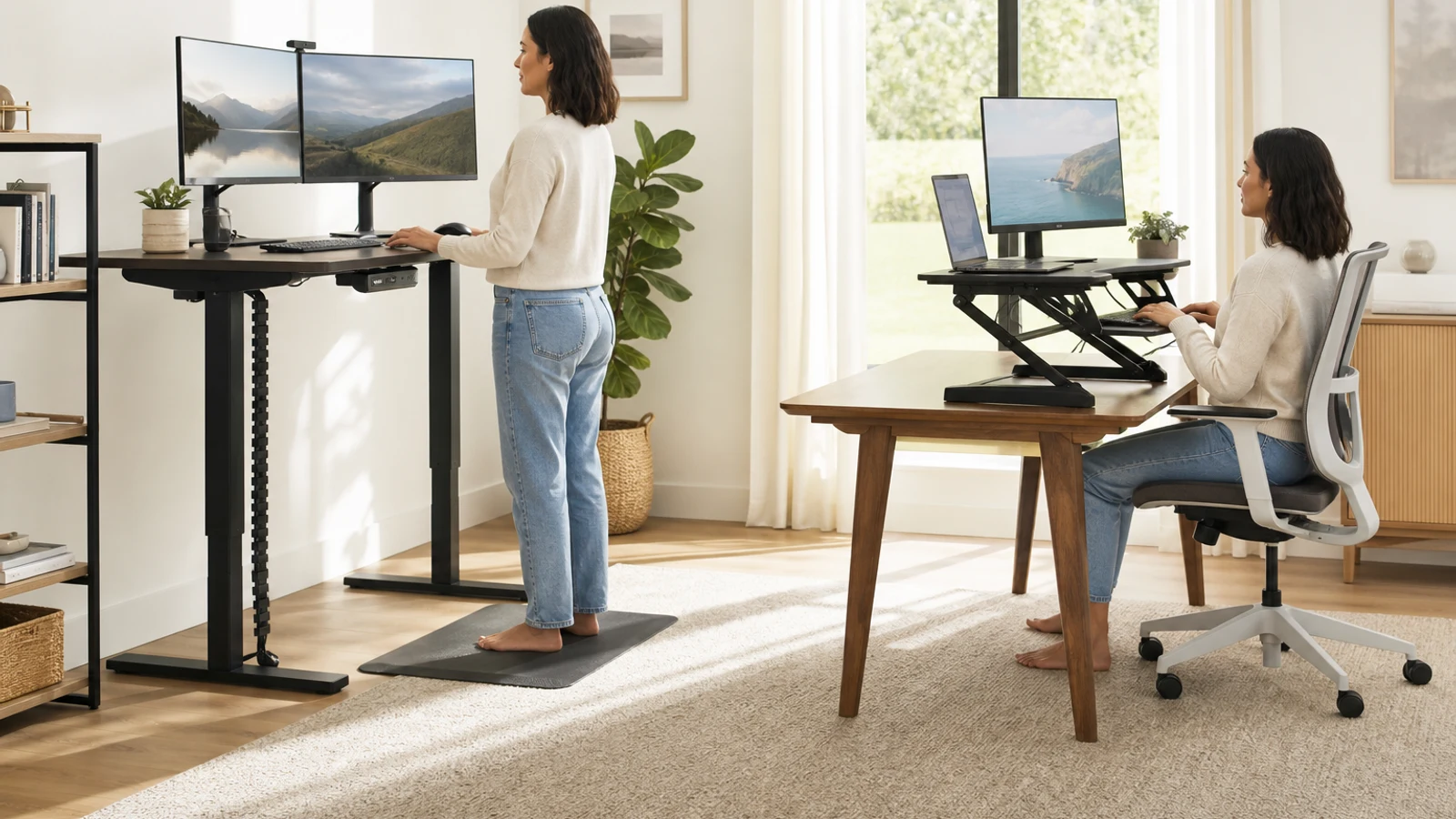
Electric Standing Desk vs Desk Converter At A Glance
| Decision Point | Electric Standing Desk | Desk Converter |
|---|---|---|
| What changes | The entire work surface raises and lowers from the floor | A platform or arm raises selected equipment on top of an existing desk |
| Best fit | Frequent sit-stand use, larger setups, new home offices | Existing desks worth keeping, smaller upgrades, limited room |
| Surface area | Usually offers a full desktop with open space for accessories | Limited by the converter platform and the desk underneath |
| Stability | Depends on frame quality, legs, desktop, and height | Depends on both the converter and the base desk |
| Seated ergonomics | Can preserve a normal desk height and clear legroom | May leave the keyboard or monitors too high when lowered |
| Installation | Requires replacing or rebuilding the desk | Usually sits on the current desk, but may be heavy |
| Upgrade flexibility | Better for adding monitors, arms, speakers, and accessories | Best for a defined setup that fits the platform and lift path |
Both products solve the same basic problem: they let you change position during computer work instead of remaining seated at one fixed height. They are not interchangeable, however. An electric standing desk replaces the desk itself, while a converter adds a raised workstation on top of furniture you already own.
That distinction affects nearly everything that matters in daily use: how much room you have, whether your knees fit comfortably when seated, how stable the monitor feels at standing height, how easy it is to manage cables, and whether the setup can grow with your equipment. The right choice is less about choosing the most advanced mechanism and more about avoiding a mismatch between the product and your current desk.
For most people who are furnishing a home office from scratch or expect to stand regularly, an electric desk is the more complete solution. For people who already have a strong, spacious desk and want a lower-disruption experiment, a converter is often the more sensible first upgrade.
The Main Difference In Everyday Use
An electric standing desk moves one large work surface vertically. Your keyboard, monitors, laptop, speakers, documents, and other equipment can remain arranged on the same surface as you change height. This makes the transition relatively straightforward: press a control, wait for the desk to reach the saved position, and continue working.
A desk converter moves only the equipment placed on it. Depending on the design, the keyboard and mouse may sit on a lower tray while monitors or a laptop sit on an upper platform. The converter itself occupies valuable space on the existing desk, and some models move forward or follow an arc as they rise. That movement can affect monitor distance, cable slack, and the location of desk accessories.
This makes the converter attractive for a compact upgrade, but it also creates more geometry to check. You are not simply asking whether the converter reaches standing height. You are asking whether the complete arrangement works at its lowest setting, its highest useful setting, and every position in between.
Choose An Electric Standing Desk If
You want a workstation that feels like one integrated piece of furniture. A full electric desk usually provides a broader working surface, better access to the space underneath, and fewer compromises when you alternate between sitting and standing. It is especially useful when more than one person may use the workstation, because the height can be adjusted rather than forcing everyone to adapt to the same fixed desk.
An electric desk is also the stronger choice when your equipment is spread across the whole desktop. A two-monitor setup, monitor arms, speakers, notebooks, charging gear, and paperwork can be difficult to fit on a converter platform. With a full desk, you can place equipment where it is comfortable instead of arranging everything around the converter’s usable area.
Choose an electric standing desk if: • You are buying furniture for a new office or replacing an unsuitable desk
- You expect to change position several times per day
- You use two or more monitors, large speakers, a desktop computer, or other heavy accessories
- You need open legroom and a normal seated desk position
- You want one continuous surface for writing, video calls, and computer work
- You may add equipment later
- You are tall, short, or sharing the desk with another user and need a broad adjustment range
Choose A Desk Converter If
A converter makes more sense when the desk underneath is already the right size, in the right location, and worth keeping. It can be a practical way to add standing capability without dismantling a home office, changing a rental property’s furniture, or committing to a much larger purchase.
Converters can also be useful when standing is a secondary position rather than the main way you work. Someone who wants to stand during video calls, reading, short administrative tasks, or a few work blocks may not need a full replacement desk. A converter can provide that option while preserving the familiar seated setup for focused keyboard work.
Choose a desk converter if: • Your existing desk is stable, deep enough, and comfortable when used normally
- You want to keep drawers, a hutch, a corner arrangement, or an attached desk configuration
- You have limited room or cannot easily move a full-size desk
- You want a lower-disruption way to test whether you will actually use standing height
- Your equipment fits on the converter without crowding the keyboard and mouse
- You mainly need a raised position for part of the day
- You can accept that the converter will consume some of the existing desktop
Ergonomics: Measure The Complete Setup
The most important measurement is not the advertised maximum height. It is the height of your keyboard when your shoulders are relaxed and your elbows are close to your sides. At standing height, the keyboard should generally be near elbow level. At seated height, your chair, desk, keyboard, and monitor should work together without forcing your shoulders upward or your wrists into an awkward angle.
Monitor height matters as well. The screen should be positioned so you can look forward without repeatedly bending your neck down. A full desk often makes this easier because the monitor and keyboard occupy one surface and can be positioned independently with monitor arms or stands. A converter may raise both at once, which is convenient if the geometry works but limiting if the monitor needs a different height from the keyboard.
Laptops require special attention. A laptop screen may be too low at seated height and too close or awkwardly positioned when standing. If you use a laptop for extended work, budget space for an external keyboard and mouse, and check whether the converter or full desk can accommodate them without crowding the work surface. Before buying, measure: • Your current desk height and depth
- Your seated elbow height and standing elbow height
- The lowest comfortable keyboard position
- The height and distance of your monitor or laptop screen
- Chair armrests, drawers, shelves, and knee clearance
- The amount of cable slack required at the highest position
- The space behind and beside the desk for movement and power cords
Stability And Equipment Load
Stability is one of the clearest differences between a good and poor sit-stand setup. Raising a work surface increases leverage, so small amounts of movement can become more noticeable at standing height. Monitor arms, tall screens, microphones, and other items can amplify that movement.
A full standing desk gets its stability from the frame, feet, desktop, and floor contact. A converter depends on all of those factors plus the existing desk. A heavy converter placed on a lightweight or narrow desk may make the entire arrangement feel less secure. A desk with a raised rear shelf, glass top, uneven surface, or limited support area may not be a suitable base even if the converter’s published load rating looks adequate.
Treat load capacity as more than the weight of the monitor. Include the keyboard tray, laptop, monitor arm, speakers, webcam, desk mat, and anything else that moves with the lifting mechanism. Keep in mind that a published maximum is not the same as a promise of perfect stability at maximum height. The shape and placement of the load matter too. Look for: • A stated lifting capacity that exceeds your real equipment weight
- A platform wide and deep enough for the complete arrangement
- A stable base desk with broad support underneath the converter
- A frame that remains steady at the height you will actually use
- Clear information about the warranty, controls, and replacement parts
- A return policy that allows you to evaluate fit and stability in your room
Space, Cable Management, And Workflow
A full electric desk changes the entire footprint of the workstation. That can be an advantage when you need a larger surface, but it may also affect wall clearance, power outlets, nearby furniture, and the path of a chair. Measure the finished desk rather than relying only on the desktop dimensions. Leave enough room for the chair to move and for the desk to rise without striking shelves, windowsills, wall art, or a ceiling-mounted fixture.
A converter preserves the room’s existing furniture footprint, but the raised platform can make the desktop feel more crowded. You may lose space for a notebook, coffee, lighting, or paperwork. Some designs also move forward during adjustment, so the front edge can approach the user or chair more than expected.
Cable management is often easier on a full desk because the entire surface moves together. You still need a power strip and enough slack for the full range, but the cables are not crossing between a moving platform and a stationary desk. With a converter, cables may need to bend or slide as the platform rises. Keep them clear of hinges, lift arms, and pinch points, and make sure a laptop charger or monitor cable is not pulled tight at the highest position.
Electric Controls Versus Manual Adjustment
This comparison focuses on electric desks, but the adjustment experience still deserves attention. Electric controls reduce the effort required to switch positions and may offer memory presets, which can make regular alternation more realistic. That convenience matters because a height-adjustable workstation is useful only if you actually adjust it.
A converter can also be electric, manual, or gas-assisted. A manual model avoids a motor and may be adequate if you adjust it occasionally. An electric converter can be easier to use frequently, but it still has the underlying space and stability limitations of a desktop unit. Do not assume that adding a motor turns a converter into the equivalent of a full standing desk.
When comparing electric models, prioritize smooth, predictable adjustment and controls that are easy to reach. Speed, display screens, and app features are secondary to height range, stability, noise, cable routing, and the ability to stop at a comfortable position.
Cost And Long-Term Value
A converter may look less expensive because it keeps your existing desk, but the comparison should include what you may need to add. A keyboard tray, monitor arm, external keyboard, cable extensions, anti-fatigue mat, or replacement desk can narrow the savings. Conversely, a full electric desk may require delivery, assembly, removal of the old desk, and a new cable-management plan.
The more often you use standing height, the more valuable the integrated design of a full desk becomes. If the converter forces you to clear the desk every time you raise it, leaves the seated position too high, or makes the monitor unstable, its lower initial cost may not translate into better value.
If you are uncertain, a converter can serve as a practical trial. It can show whether you will actually alternate positions before you invest in a replacement desk. However, treat the trial fairly: a converter that is too small, unstable, or poorly adjusted may tell you more about that particular setup than about sit-stand workstations generally.
When Not To Buy Or Upgrade Yet
Neither option is automatically worthwhile if your current discomfort is caused by a chair, monitor position, lighting, or poor keyboard placement. A standing desk cannot correct an undersized workspace or compensate for a screen that is too low. You may get more benefit from adjusting the existing workstation first.
Do not buy a converter if the desk underneath is flimsy, too shallow, damaged, or already crowded. Do not buy a full electric desk if you do not have enough room for the desktop to rise safely or if you expect to stand continuously for long periods. Alternating positions and moving regularly is generally more practical than treating standing as a replacement for all sitting.
Consider waiting if you have not measured your standing and seated elbow heights, do not know where the monitors will go, or have not decided whether you need a laptop, one monitor, or a larger multi-device setup. A few minutes of measuring can prevent a costly mismatch.
A Practical Decision Framework
Start with the furniture decision, not the motor. If you would keep your current desk even without the standing feature, evaluate a converter. If the desk is too small, too low, too high, unstable, or poorly suited to your equipment, replacing it with an electric model is usually the cleaner path.
Next, evaluate how often you will change positions. Occasional standing favors a converter when the setup fits. Frequent switching favors an electric desk because the full surface moves together and the controls reduce friction.
Finally, evaluate what happens after the purchase. Choose the option that preserves a comfortable seated position, supports your real equipment, leaves enough room for movement, and does not create a cable or stability problem. A useful final checklist: • Confirm both seated and standing keyboard heights
- Check the full equipment weight, not just the monitor weight
- Verify the desk or converter depth with your monitor distance
- Account for monitor-arm movement and cable slack
- Check knee clearance at the lowest position
- Reserve room for the chair, power cord, and nearby furniture
- Plan for a floor mat or supportive footwear if you stand regularly
- Use a return policy when stability or fit cannot be confirmed in advance
The Bottom Line
An electric standing desk is the better upgrade when you want a complete, frequently used sit-stand workstation with more surface area, open legroom, cleaner cable movement, and room to grow. It is the safer default for a new home-office setup or a demanding multi-monitor arrangement.
A desk converter is the better upgrade when your existing desk is solid and well located, you want to preserve it, and standing is a secondary position rather than the center of your workflow. It can deliver the core benefit with less disruption, but only if the platform, height range, seated position, and stability all work together.
If you are undecided, measure first and test your intended keyboard height with books or a temporary riser. The product that supports a comfortable seated and standing workflow—not simply the one with the largest advertised height range—is the one most likely to earn its space and stay in use.
Go Deeper Before You Choose
For more context, see home office essentials.
For more context, see office chair features worth paying for.
Research References
These sources informed the factual background for this guide. BuyingView applies its own editorial judgment to the purchase decision.
Questions & Answers
Useful follow-up questions that often change the buying decision.
Is an electric standing desk better for your health than a desk converter?
Neither format is automatically healthier. Both can help you alternate positions, but the benefit depends on using a comfortable setup and moving regularly. A standing desk does not make prolonged standing ideal, and a converter is not useful if it creates awkward monitor, keyboard, or seated height problems.
Can a desk converter hold two monitors?
Some can, but the answer depends on platform width, depth, weight capacity, monitor stands or arms, and stability at the height you need. Measure the complete monitor arrangement rather than relying on the converter’s headline width. Two monitors may also leave little room for a keyboard, mouse, and other work items.
Do standing desk converters damage regular desks?
A properly supported converter should not damage a suitable desk, but its weight and concentrated load can be a problem for weak, glass, narrow, uneven, or poorly supported surfaces. Check the base footprint, desk construction, and the manufacturer’s placement requirements before installation.
Is it worth upgrading from a converter to a full standing desk?
An upgrade may be worthwhile if you switch positions frequently, need more surface area, experience wobble, cannot get a comfortable seated height, or have added heavier equipment. If your converter remains stable and comfortable and you use standing only occasionally, replacing it may not provide enough additional value.
Should you stand all day at a standing desk?
No. A sit-stand desk is intended to make position changes easier, not to require continuous standing. Alternate between sitting and standing, change posture, take movement breaks, and use supportive footwear or a suitable mat when standing for longer work periods.
What should be measured before buying either option?
Measure your current desk height and depth, seated and standing elbow heights, monitor position, chair and knee clearance, equipment weight, cable slack, and the space around the workstation. For a converter, also measure the flat support area on the existing desk and the platform dimensions at the raised position.